πŸ† How to Play BracketGamer
🎯 Join a Pool

Getting started with BracketGamer is simple and fun. Follow these steps to join your first pool:

  • Browse Available Pools: From the home page, you'll see a list of all available pools. Each pool has its own rules, entry fee, and scoring system (if applicable). Currently, all the pools are pick 4 based
  • Add to Cart: Click the "Add to Cart" button next to the pool you want to join. You can add multiple pools to your cart before checking out.
  • Review Your Cart: Click the "Check Out" button to review all the pools you've selected and complete your purchase.
  • Submit Payment: Follow the secure payment process to complete your pool entry.
  • Start Making Picks: Once you've paid, you'll be redireced back to the home page and have access to make your picks in the bracket.
πŸ’‘ Pro Tip: You can join multiple pools in the same season. Each pool has its own bracket, so you can try different strategies across multiple pools.
βš™οΈ Create Your Own Pool

Want to run your own bracket pool? BracketGamer makes it easy to create and manage your tournament for friends, family, or coworkers:

  • Create an Account: If you don't have one already, sign up for a BracketGamer account to get started.
  • Click Create Pool: From the home page, click the "Create Pool" button to begin setting up your tournament.
  • Enter Pool Details: Fill in your pool information including the name, entry fee (if any), scoring settings, and any custom rules you'd like to apply.
  • Invite Players: Once your pool is created, you can invite players via email or share a custom join link.

Managing Your Pool:

Under "Pools I Currently Manage," you'll find the Manage Pools page where you can:

  • Add or Remove Players: Keep your participant list up-to-date by adding new players or removing those who can't participate.
  • Edit Number of Winners: Adjust how many places will receive payouts based on your pool's payout structure.
  • Mark Who's Paid Up: Track which players have paid their entry fees to keep everything organized.
  • Create Invite Emails: Generate invitation emails and easily copy the email list to communicate with all your players at once.
πŸ’‘ Commissioner Tips: Stay organized by marking payments as they come in, and use the email list feature to keep everyone informed about deadlines, rule changes, or winner announcements. Communication is key to running a successful pool!
πŸ“‹ How to Make Picks

Making picks in your bracket is where the fun begins. Here's how to navigate the bracket and make your selections:

  • Access Your Bracket: From the home page, click the "VIEW" button under "Picks and Bracket" to open your bracket.
  • Make Selections: Click on the checkbox next to each name to make a selection. Pick four teams or a first four game to select to select the winner of that game. The selected teams will appear in the "My Picks" box.
  • Enter A Screen Name: Enter a screen name other players will see during the tournament.
  • Enter A Tie Break Score: Your commissioner will have selected a first round game to use as the tiebreak score if needed. Enter a TOTAL value for both teams scores added together. Closest without going over wins.
  • Use the Minimap: The minimap in the bottom-right corner gives you a bird's-eye view of your entire bracket. Click on any region to quickly navigate to that section.
  • Picks by Region: The picks by region indicator quickly tells you at a glance when your picks might collide.
  • Compare Teams: Click the comparison icon (scales images) on a given matchup to get an overview before making picks.
  • Submit Your Picks: Once you're satisfied with your choices, submit your picks. You can modify your picks up until the first round games start on Thursday.
⚠️ Important: Make sure to submit your picks before the Thursdaygames start. Late submissions will not be accepted. Refer to you commissioners email for specific times.
πŸ“Š Scoring

BracketGamer uses a seed-based scoring system that rewards both accuracy and bold picks. Here's how points are earned:

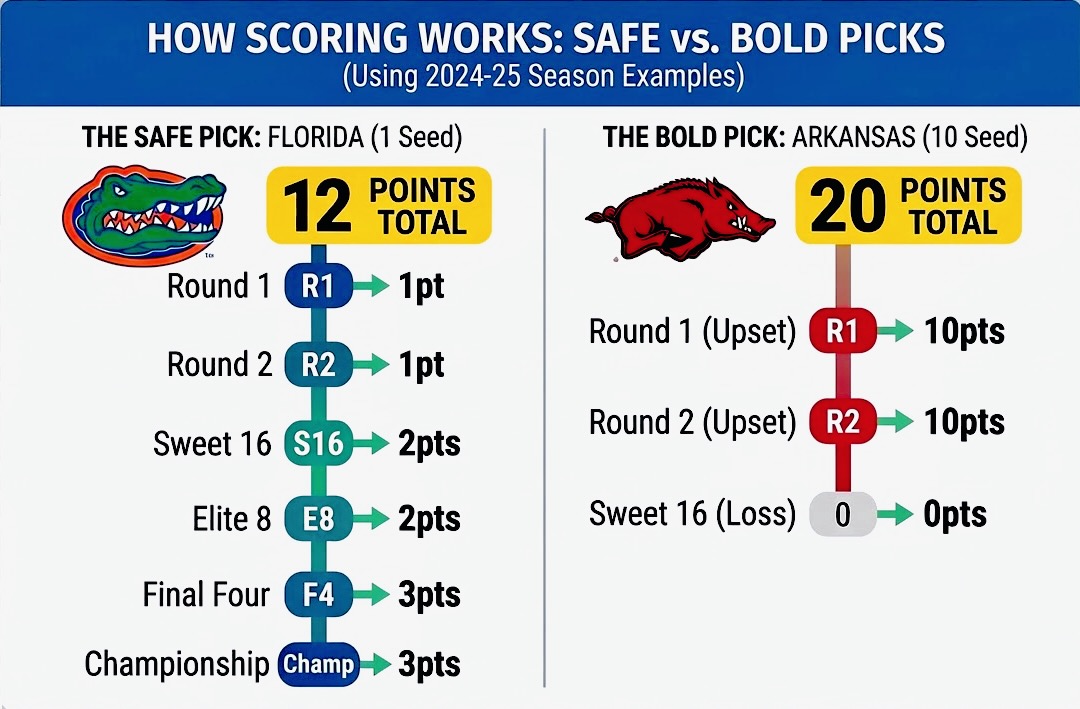
Points are awarded based on the seed of the team and how far they advance.

The first two rounds are worth the seed x 1 point.

Round 3 and 4 are worth the seed x 2 points.

Round 5 and 6 are worth the seed x 3 points.

So picking a 1 seed to win in the first round is worth 1 point, but picking a 10 seed to win in the first round is worth 10 point.

BracketGamer Scoring Example

Scoring Strategy:

  • Pick all #1 seeds and you might get a safe, moderate score.
  • Pick upsets with lower seeds, and you earn more pointsβ€”but only if they win!
  • The key is balancing safe picks with strategic upsets to maximize your total points.
🎲 The Cinderella Effect: One upset pick could change everything. Picking a 12-seed to advance further than a 5-seed gives you higher points, but requires them to actually win. This is what makes BracketGamer exciting!
πŸ€– Scenario Tool

The Scenario Tool is your secret weapon for analyzing and optimizing your bracket. Use it to test different pick combinations and see how they'd score:

  • Access the Tool: Click the floating button in the bottom-right corner of your bracket to open the Scenario Tools panel.
  • Make Test Picks: Tap any team in the bracket to advance them to the next round without affecting your official picks. Test different scenarios to see how they score.
  • Calculate Score: Click the "πŸ“Š Calculate" button to see your potential score based on the teams currently selected in the scenario.
  • Best Case Scenario: Click the "πŸ† Best Case" button to automatically advance all your teams as far as they can go prioritizing lower seeds to maximize points. This shows you the maximum possible points you could earn with your current picks (assuming all your teams win).
  • View Pool Standings: After calculating a scenario, you'll see how your score would rank against other pool participants.
  • Reset: Click the "β†Ί Reset" button to clear your scenario picks and start fresh. The official bracket remains unchanged.
πŸ’‘ Strategy Tips:
  • Use the Scenario Tool to explore "what-if" situations before submitting your final picks.
  • Test bold upset picks to see if the higher point values justify the risk.
  • Check the pool standings frequently to see how your score compares to competitors.
  • Build out different scenarios after play begins to check potential outcomes or pray for miracles.
  • Remember: The Scenario Tool is just for analysis. Your official picks are what count toward your final score.